Cockpit OpenShift
cockpit-openshift is a Cockpit plugin for guided OpenShift SNO and compact
cluster deployment on one KVM/libvirt host. The plugin keeps host inputs,
generated installer artifacts, VM plans, deployment status, and post-install
inventory in one local operator surface.




Quick Start
- RPM install
- Source install
- Open Cockpit
sudo dnf install -y rpm-build
cd /path/to/cockpit-openshift
./build-rpm.sh
sudo dnf install -y ./rpmbuild/RPMS/noarch/cockpit-openshift-0.1.0-1.el10.noarch.rpm
The exact RPM filename depends on the build host distribution suffix.
sudo mkdir -p /usr/share/cockpit/cockpit-openshift
sudo install -m 0644 src/cockpit-openshift/manifest.json /usr/share/cockpit/cockpit-openshift/
sudo install -m 0644 src/cockpit-openshift/index.html /usr/share/cockpit/cockpit-openshift/
sudo install -m 0644 src/cockpit-openshift/create.html /usr/share/cockpit/cockpit-openshift/
sudo install -m 0644 src/cockpit-openshift/overview.html /usr/share/cockpit/cockpit-openshift/
sudo install -m 0644 src/cockpit-openshift/cockpit-openshift.css /usr/share/cockpit/cockpit-openshift/
sudo install -m 0644 src/cockpit-openshift/cockpit-openshift.js /usr/share/cockpit/cockpit-openshift/
sudo install -m 0644 src/cockpit-openshift/cluster-list.js /usr/share/cockpit/cockpit-openshift/
sudo install -m 0644 src/cockpit-openshift/cluster-overview.js /usr/share/cockpit/cockpit-openshift/
sudo install -m 0755 src/cockpit-openshift/installer_backend.py /usr/share/cockpit/cockpit-openshift/
Use the source path when you are iterating on local plugin files.
sudo systemctl enable --now cockpit.socket
Open https://<host>:9090 and navigate to OpenShift.
Current Support
The validated path is intentionally narrow. Use the table to check whether the current workflow matches the host and topology you plan to run.
| Area | Current path |
|---|---|
| Architecture | x86_64 |
| Networking | static node networking |
| Topologies | SNO with one control-plane node, compact with three control-plane nodes |
| Storage pools | directory-backed and logical libvirt storage pools |
DHCP is modeled in the UI, but it is not yet validated. Treat static node networking as the supported path until DHCP is proven end to end.
Install Model
Cockpit OpenShift is installed on the KVM/libvirt host that will run the local
OpenShift workflow. The backend owns installer downloads, generated artifacts,
libvirt VM creation, status tracking, and cluster inventory under
/var/lib/cockpit-openshift/.
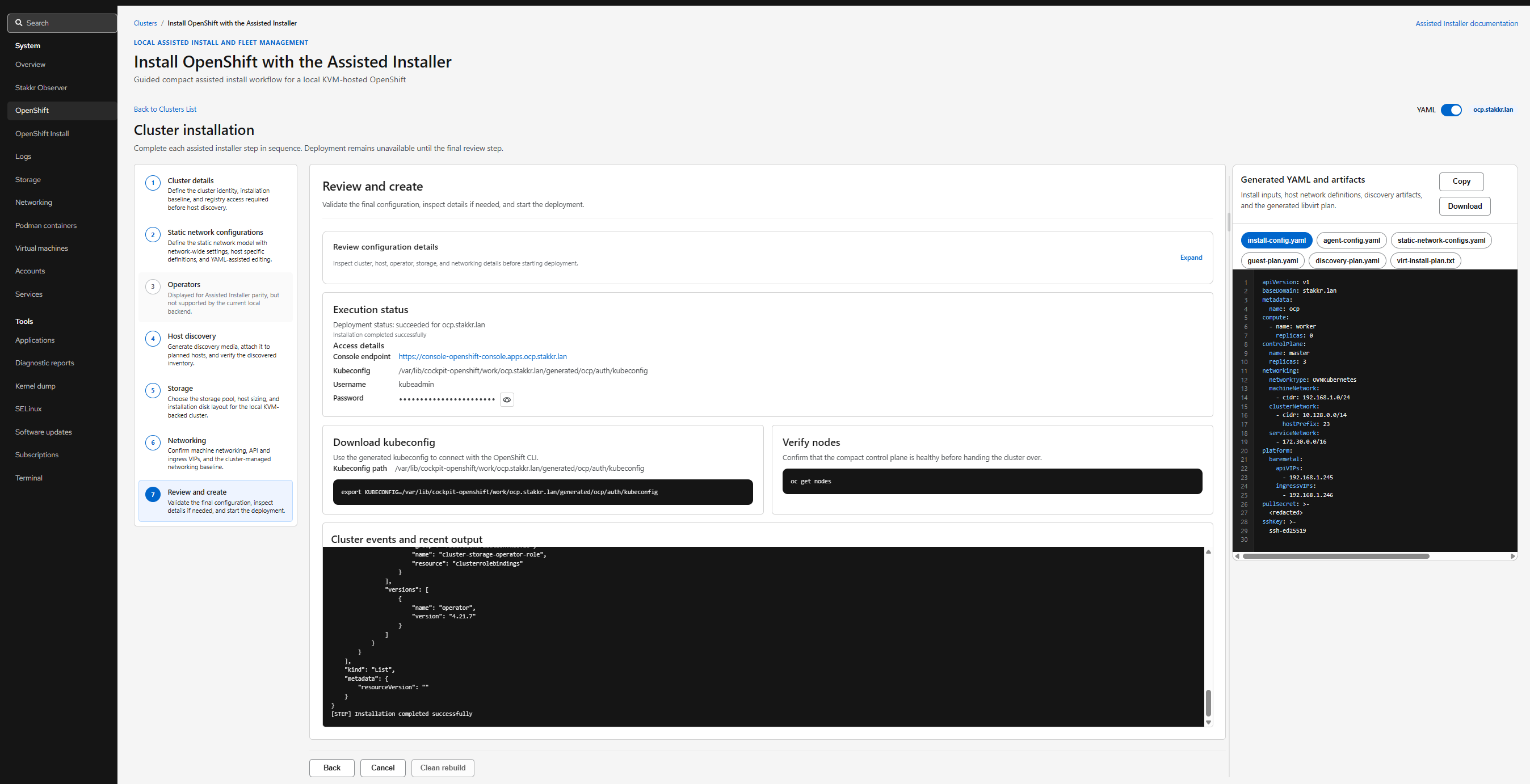
The operator provides the pull secret, SSH public key, DNS, VIPs, and node IPs. The UI redacts the pull secret in generated YAML previews.
Operator Screens
First Workflow
- SNO
- Compact
- Review only
- Choose the single-node topology.
- Provide cluster identity, pull secret, SSH key, DNS, API VIP, ingress VIP, and static node networking.
- Review generated installer artifacts.
- Deploy from the final review step.
- Choose the three-control-plane topology.
- Confirm host sizing, libvirt storage, bridge, node IPs, and VIPs.
- Review the guest plan, discovery plan, static networking, and installer YAML.
- Deploy from the final review step.
- Stay in the create flow until artifact review.
- Inspect
install-config.yaml,agent-config.yaml,static-network-configs.yaml, andvirt-install-plan.txt. - Deploy only after DNS, VIPs, node IPs, and guest sizing match the intended host plan.
Workflow Shape
The workflow keeps host preparation, guided input, artifact review, deployment, and post-install inventory in one local operator surface.
Prepare
Confirm Cockpit, libvirt, storage, DNS, pull secret, SSH key, node IPs, and VIPs.
Host and input model readyCreate
Choose SNO or compact topology, then enter cluster identity and static networking.
Cluster intent capturedReview
Inspect installer YAML, guest plan, discovery plan, and the generated virt-install plan.
Deploy
Launch from Cockpit, track status, return to inventory, reprovision, or destroy.
Cluster state trackedExplore
What The Plugin Covers
- guided OpenShift SNO deployment
- guided OpenShift compact deployment
- self-contained local backend for installer artifacts, libvirt storage, and domain creation
- rendered
install-config.yaml,agent-config.yaml, guest plan, andvirt-installplan review - deployment status, recent output, and deployed-cluster inventory
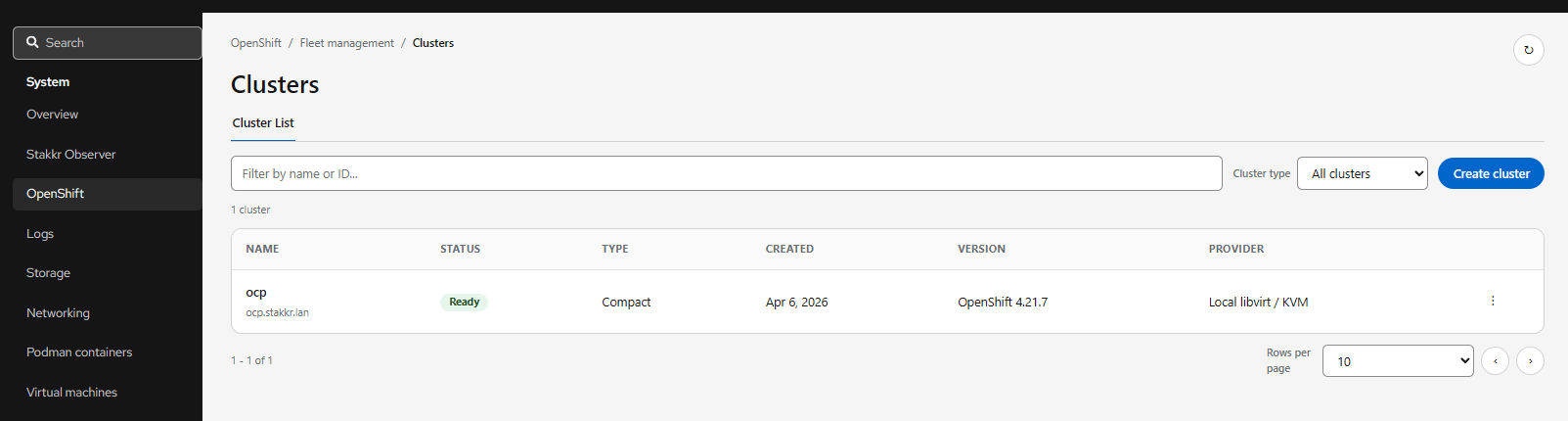
- reprovision and destroy actions from the UI